

Mix and match to design your own fireplace
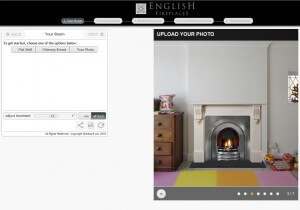 One of the toughest parts of any purchase is visualising the product that you are about to buy in situ.
This is especially so when the goods are something permanent like a fire surround with hearth and basket.
From our website you can use this brilliant tool that allows you to build your fireplace digitally. You can mix and match most of our products until you find the right combination then customise your choice with a range of options to create your perfect fireplace. It can help you make decisions with confidence about the final look.
Would you like to see your chosen fire surround in limestone instead of marble?
Would you like to see whether you prefer an insert or a basket?
Would you like to see the fireplace in position, to scale, in your room?
With the application, you can answer all of the above. It is important to get this stage right so you can have an excellent idea of what you are investing in. And along with our consultation, you will be getting the fireplace that is right for you and your home.
It’s a free to use service, so start here to Design your own fireplace.
It is worth registering with the application to get the most benefits from it. This includes uploading a photo of your room and the ability to save your design(s) and email them to friends.
It’s simple to register, just click the button on the top right of the screen and follow the instructions.
Once you’ve registered, you have access to the application. As you can see on the main page, there are five steps to work through. The application is straight-forward and leads you through the options you have and the steps to take.
1) Your Room
 From here you can upload a photo of your room if you have one and edit it to make it fit.
You’ll need to have the measurements of something in the photo to make it to scale. You’ll also need the measurements of your chamber as well.
If you are not using a photo you can set the width of the chimney breast, if you have one, to match the one in your home. You can also use this function to match the colour of your wall and flooring to your home as well.
Throughout the application, you have the opportunity to retain measurements at a set amount. The first time you can do this is with the “Lock Dimensions” button. This will keep the dimensions you entered for your chamber and room constant throughout the process.
Click “NEXT” in the left hand box to choose your surround.
2) Your Surround

Select from Period and/or material. Try as many as you like to see which works best for you.
By default, you will be working in Imperial – but you can change this to Metric at the bottom of the left hand box. Once again, you have the opportunity to lock various dimensions if you wish to. Any measurement with a “Lock” button next to it can be retained.
3) Fireplace Interior
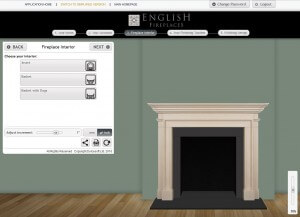
Decide on an insert or a basket and the type of finish you prefer.
The Inserts, Grates & Hearths section on our website has which types of fire each of the baskets or inserts can have. Some baskets can be made to measure at no extra cost (or very little if the change is dramatic) if required.
Your choice here affects Step 4.
4) Your Finishing Touches
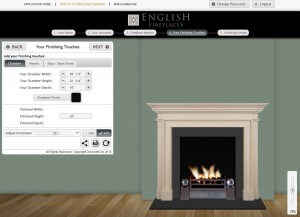
There are three parts to this. What will the inside of your chamber be, what type of hearth would you like and whether you will using slips / back panel for your fire?
Tab; Chamber
Choose the internal lining of your chamber.
Tab; Hearth
Choose the type of material and style of hearth you would like. There are no rules here – some people like the hearth to be of the same stone as the surround, some prefer a contrasting stone such as slate or granite.
Tab; Slips/Back Panel
Slips or a back panel can be used for both the aesthetic and functionality. Not required if you choose an insert.
A glass header is used to improve the draw of the fire but does not visually reduce the size of the opening.
Again, the “Lock Dimensions” function is available if required.
5) Finishing Design
 You can now email your design to someone, get a link so you can edit at a later date and/or create a jpeg image.
Try the application for yourself and see what you can create here. If you have any questions about the process, give us a call on 01730 897 600.
If you would like us to put together something for you, or you would like to discuss how we can help you make your fireplace design a reality, then please get in touch.